Weekend Project: Sending Emails to My Second Brain
I built a pipeline that turns any email into a tagged Markdown note in my Obsidian vault, using nothing but Gmail, Apps Script, and the GitHub API.
Listen to this post
Weekend Project: Sending Emails to My Second Brain
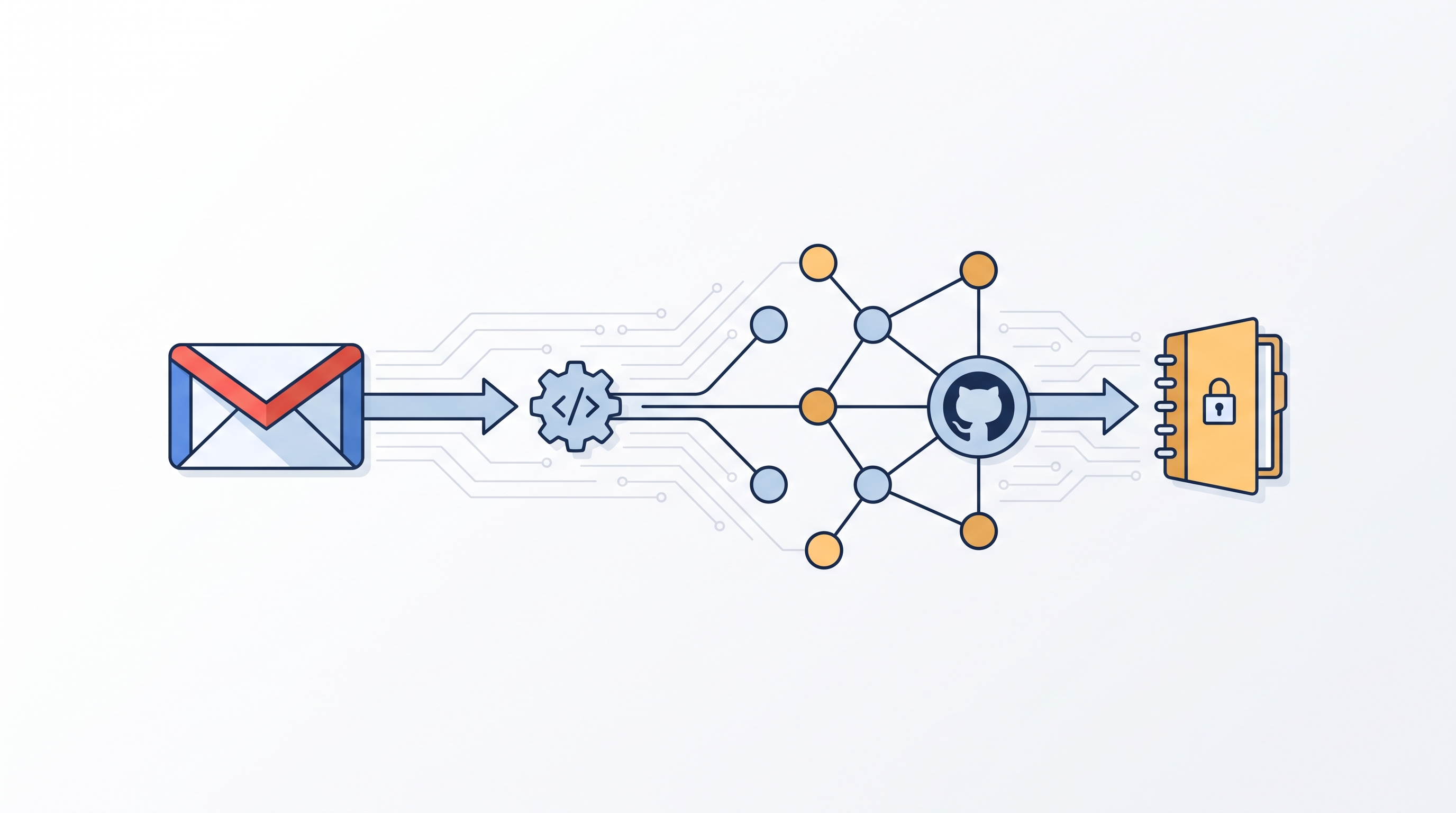
I read something worth keeping almost every day. An article a colleague sends. A PDF from a conference. A link buried in a text message I will never find again. Most of it dies in my inbox.
I wanted a dumb, reliable pipe. Email something to one address and have it land in my Obsidian vault as a clean, tagged note. No app to open. No copy-paste. Just send and forget.
This weekend I built it. It did not go in a straight line, and I think the detours are the useful part of this post.
The Problem With “Just Use Zapier”
I could pay for an integration tool and be done in twenty minutes. But I run my vault on GitHub, and most no-code tools treat GitHub as an afterthought. I also wanted to own every part of the pipeline, since some of what lands in this inbox is professionally sensitive. A black box service in the middle was never going to work for me.
So I built it from three pieces I already trust: Gmail, Google Apps Script, and the GitHub API.
The Architecture
Email → dedicated Gmail address
    ↓
Gmail filter applies a label
    ↓
Apps Script runs on a timer
    ↓
Converts the message to Markdown with YAML frontmatter
    ↓
GitHub Contents API commits the file
    ↓
Message gets labeled Processed
    ↓
I pull the new commit into Obsidian
Three services, no third-party glue. Apps Script is the part that surprised me. It runs inside Google’s ecosystem, so it can read Gmail directly without the OAuth dance a GitHub Action would need to reach into someone’s inbox from outside. It also makes outbound HTTP calls natively, which means it can talk to the GitHub API without a single external dependency.
Why GitHub Actions Should Not Poll Gmail
I considered this first. It is possible. It is also the wrong tool. GitHub Actions would need Gmail OAuth credentials, refresh token management, and its own duplicate-detection logic just to read an inbox. Apps Script already lives inside Gmail. It reads labels, applies labels, and calls out to GitHub in about sixty lines of code.
The rule I landed on: Apps Script owns capture. GitHub Actions owns enrichment, later, after the note already exists in the repo.
What Happens to an Email, Start to Finish
Send a message to the dedicated address. A Gmail filter tags it. Every ten minutes, a script wakes up, finds tagged and unprocessed threads, and for each one:
- Pulls the subject, sender, date, and plain-text body
- Builds a YAML frontmatter block with metadata Dataview can query later
- Writes the file to
raw/email/YYYY/MM/using a timestamped, slugified filename - Commits it through the GitHub Contents API
- Relabels the thread as processed
The note that lands in my vault looks like this:
---
title: "Article About AI and Medical Practice"
type: email
source: gmail
status: raw
received: 2026-07-11T14:32:05-04:00
from:
  name: "John Smith"
  email: "john@example.com"
tags: [inbox, email, raw]
---
Followed by the message body and a short processing checklist. status: raw matters. It is the hook a later automation step will use to route the note into the right corner of the vault, the same architecture I described in Building the Physician’s Knowledge Flywheel: DoctorsWhoCode, Theology, Research, or Personal.
Where It Actually Went Wrong
The failures are where the real lessons live. None of them were exotic. All of them were the kind of thing that costs you forty minutes if you do not know what you are looking at.
Bad Credentials, and the Token That Never Saved
First real test run: five identical errors, back to back.
ERROR processing message: Error: GitHub commit failed (401):
{ "message": "Bad credentials", "status": "401" }
A 401 on a GitHub API call almost always means the token itself is the problem, not the repo path or the permissions model. I wrote a small diagnostic function to check what was actually sitting in Script Properties:
function debugToken() {
  const token = PropertiesService.getScriptProperties().getProperty('GITHUB_TOKEN');
  Logger.log('Token length: ' + (token ? token.length : 'MISSING'));
  Logger.log('Token starts with: ' + (token ? token.substring(0, 8) : 'N/A'));
}MISSING. The token had never actually been written to Script Properties. Looking back at my setup function, I found the bug: the GITHUB_TOKEN line had drifted outside the props.setProperties({...}) block during an earlier edit. It sat in the file looking correct, indented like it belonged, but it was not inside the object being saved. Classic copy-paste casualty.
The fix was mechanical: move the key back inside the object, run the setup function once, confirm with debugToken, then blank the token back out of the source.
function setupProperties() {
  const props = PropertiesService.getScriptProperties();
  props.setProperties({
    GITHUB_TOKEN: 'github_pat_...',
    GITHUB_OWNER: 'chukwumaonyeije',
    GITHUB_REPO: 'DrOnyeije_Wiki',
    GITHUB_BRANCH: 'main',
    GITHUB_RAW_PATH: 'raw/email'
  });
  Logger.log('Properties saved.');
}
Lesson: when a credential error shows up, verify what is actually stored before you touch the token itself. The token was probably fine the whole time. It just never got where it needed to go.
The Dropdown Lied to Me
Small thing, but it cost real confusion. Apps Script keeps a function selector at the top of the editor. I had debugToken selected, hit Run, and got:
Error: Attempted to execute myFunction, but it was deleted.myFunction is the default stub Apps Script drops into every new project. I had deleted it from the source ages ago, but the editor’s dropdown had gone stale and still pointed at it. Refreshing the tab and reselecting the function from the dropdown fixed it. Worth knowing this exists, because the error message makes it sound like a code problem when it is really a UI caching problem.
YAML That Broke on My Own Display Name
The pipeline ran clean, committed a file, and Obsidian’s own YAML parser choked on it:
Error in user YAML: did not find expected '-' indicator
while parsing a block collection at line 11 column 3
The cause: my Gmail address has a display name attached, "Dr. Onyeije Raw for Obsidian" <dronyeijeraw@gmail.com>. That string already contains double quotes. My script wrapped the whole thing in another pair of quotes for the to: field in YAML, and the nested, unescaped quotes broke the parser.
I already had an escapeYaml() helper in the file, used for the subject and sender name. I just had not applied it to the to: field.
// before
to:
  - "${data.to}"

// after
to:
  - "${escapeYaml(data.to)}"
One line. Lesson: if you build an escaping helper, audit every field that touches user-controlled text, not just the obvious ones. Your own email address turned out to be the field most likely to contain quote characters.
A Function That Existed in the Plan but Not in the Project
Attachment handling threw a plain JavaScript error, not a GitHub or YAML error:
ReferenceError: handleAttachments is not definedMain.gs called a function that lived in a file I had not created yet. The core capture pipeline, Config, GitHub, Main, was built and tested first, exactly as planned, but attachment support was still just a reference to a function that did not exist. Once I added Attachments.gs with the actual handleAttachments() implementation, the error disappeared.
A related trap: I ran handleAttachments directly from the dropdown to test it, by itself, and got:
TypeError: Cannot read properties of undefined (reading 'forEach')That function was never meant to run standalone. It expects processInbox to hand it real attachment data. Running a helper function in isolation, without its caller supplying arguments, will fail even when the helper itself is correct. Worth remembering when you are debugging a multi-function pipeline: test the entry point, not the internals, unless you are deliberately feeding the internals fake data.
Attachments, Once They Worked
PDFs and images get pulled as bytes, base64-encoded, and committed separately under raw/attachments/YYYY/MM/, with an Obsidian embed link dropped into the note:
## Attachments

- [[attachments/2026/07/research-paper.pdf]]
- ![[attachments/2026/07/diagram.png]]
I capped supported types at PDF, PNG, JPG, DOCX, and plain text to start. Anything larger than a few megabytes gets skipped rather than silently failing, since the GitHub Contents API has real payload limits.
Making It Hands-Off
Once processInbox ran clean end to end, manually clicking Run in the Apps Script editor got old fast. The fix is a time-driven trigger:
- Apps Script editor → Triggers (clock icon) → Add Trigger
- Function:
processInbox - Event source: Time-driven
- Type: Minutes timer, every 10 minutes
Google re-prompts for the same Gmail and external-request permissions the first time you save a trigger. Approve it, and the pipeline runs itself from there.
I do not auto-pull into Obsidian. I pull manually when I open the vault. That is a deliberate choice, not a gap. I would rather control exactly when new material shows up in my working files than have it appear mid-session.
The Part I Almost Skipped: Security
This inbox will eventually catch things I do not want sitting in a public repo. Three decisions kept it clean:
- The repository is private.
- The GitHub token is fine-grained, scoped to this one repo, with contents read-write only. Nothing else.
- The token lives in Apps Script’s property store, never in the source code.
What Comes Next
Right now the pipeline does one job well: capture. The next phase is a GitHub Action that fires whenever a new file lands in raw/email/, normalizes the frontmatter, and suggests tags. After that, I want an agent to periodically sweep everything still marked status: raw and file it into the right corner of the vault on its own, the same routing logic I laid out in The PKM System That Was Never Built for You.
But I am resisting the urge to build all of it this weekend. Capture first. Make it boring and reliable. Enrichment can wait until I trust the plumbing, and after this weekend, I trust it a lot more than I did on Friday.
Read Your Own Error Logs
You do not need a subscription service to build a second brain. Gmail, Apps Script, and a GitHub token got me most of the way there in an afternoon, plus another hour or two chasing down a stray token, a stale dropdown, an unescaped quote, and a missing function.
None of those bugs were hard once I saw them. That is usually how it goes. The platforms you already use can talk to each other if you are willing to write the sixty lines connecting them.
Read your own error logs instead of guessing. That is the whole trick.
Related Posts

The Rare Condition You Have Seen Ten Times
Why a physician's second brain turns scattered rare cases into a queryable clinical registry owned by the clinician who lived them.
The Lemonade Machine Problem
Automation in medicine should not be judged against an ideal clinician. It should be judged against real human variance, machine variance, supervision, and the cost of failure.

Burnout Is Not From Working Too Hard. It Is From Working on the Wrong Things.
For physician-developers, burnout often comes from low-value technical friction. The answer is not more endurance. It is better delegation to systems, automation, and agents.

Maternal-Fetal Medicine Specialist